

PresenceAssure
Verify Presence.
Assure Access.
PresenceAssure combines biometric and presence verification with configurable sign-in workflows, helping organizations strengthen security and support touchless access without replacing their existing identity systems.
Request a demo How it works
Challenge
When Identity Alone Is Not Enough
Organizations need confidence that the right person is accessing sensitive systems. They also need authentication that fits different applications, users, and working environments—without creating unnecessary friction or inconsistent controls.
Uncertainty After Login
Verifying identity at sign-in does not, by itself, show that the same person remains present. Sensitive workflows may require additional presence checks during the session.
Sign-In That Disrupts Work
Repeated prompts, passwords, and card interactions can interrupt work. Shared workstations and environments involving gloves or protective equipment need authentication options suited to the task.
Inconsistent Controls Across Applications
Different applications, roles, and user groups may need different authentication checks. Managing those requirements separately can make controls harder to apply consistently, update, and audit.
Modernizing Without Starting Over
Organizations need stronger authentication without disrupting the identity systems they already rely on. New capabilities must fit existing directories, credentials, and applications—not create another disconnected system.
Solution
PresenceAssure: High-Assurance Authentication Built Around Real Presence
PresenceAssure is a configurable authentication platform that verifies user identity and
physical presence while letting organizations tailor how those checks happen. Administrators
can build workflows that combine supported authentication methods, biometric matching,
liveness detection, and proximity or wearable signals, choosing the appropriate checks for
each application, user group, role, and risk level.
PresenceAssure extends Windows authentication and web single sign-on without replacing your
existing identity infrastructure. Designed for regulated enterprises, it integrates with
Active Directory, cloud identity providers, and standards-based federation, and supports
FIDO and certificate-based authentication, including PIV.
Verify Identity and Presence
Verify user identity and physical presence when access is requested. In supported configurations, continue checking presence during the session according to your organization’s policies.
Strong Authentication Options
Support phishing-resistant sign-in through FIDO and supported certificate-based authentication, including PIV. Use compatible smart cards, security keys, and wearables to meet your organization’s authentication requirements.
Configurable Authentication Workflows
Build workflows for specific applications, user groups, roles, and risk levels. Choose required and optional checks, set retry limits and timeouts, and define approved fallback methods.
Touchless and Passwordless Access
Offer touchless and passwordless options for supported workflows, reducing the need to type passwords or insert cards. Adapt the sign-in experience to the demands of the work environment.
Centralized Monitoring and Audit
Monitor authentication results through centralized dashboards, reports, and audit trails. Give security and operations teams visibility into authentication activity for troubleshooting, oversight, and investigations.
Integration With Existing Systems
Extend Windows authentication and web single sign-on without replacing your identity and authorization systems. Connect with Active Directory and supported cloud identity providers.
How It Works
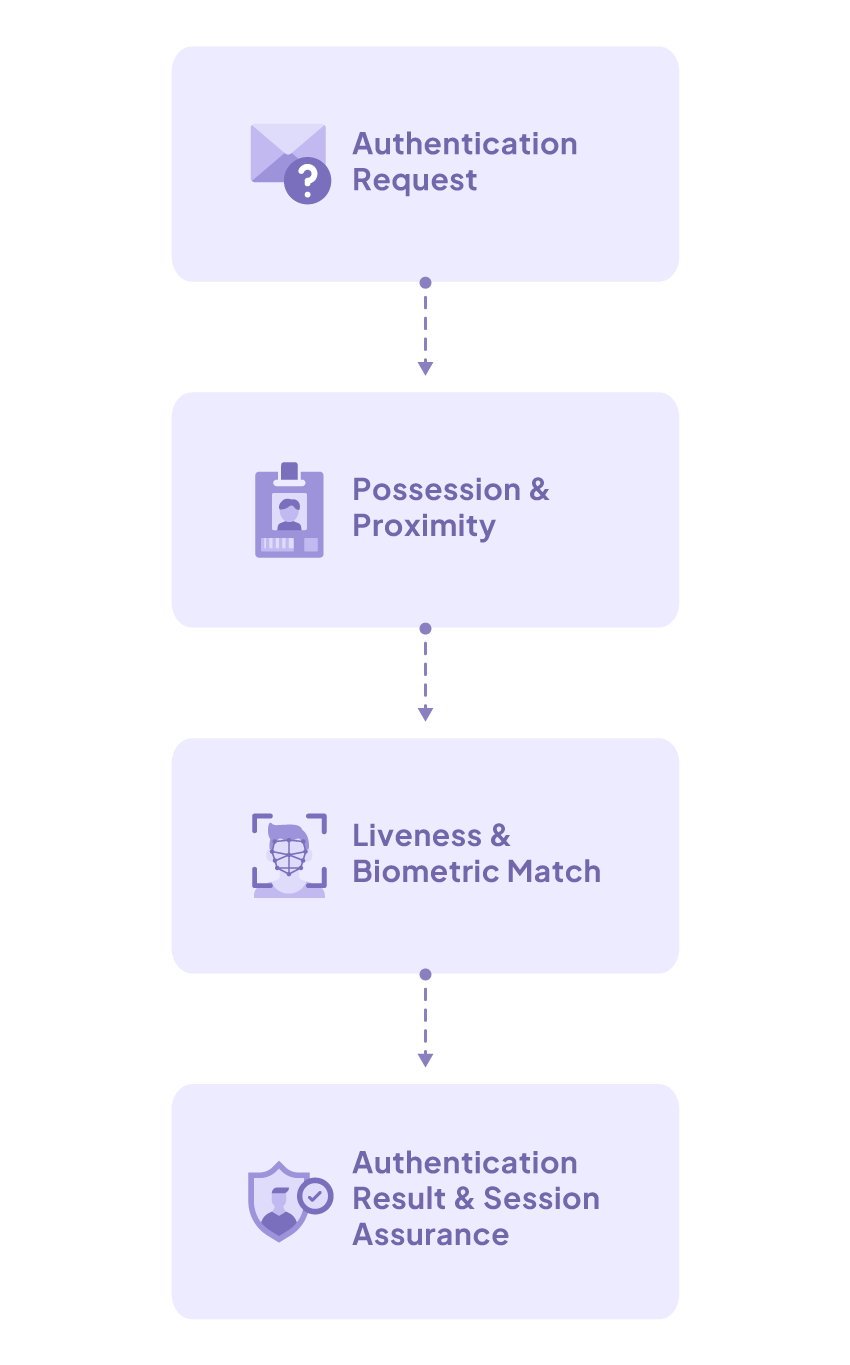
A Configurable Journey from Access Request to Assured Session
PresenceAssure evaluates the authentication context, invokes the required methods and factors, verifies identity and real presence, and applies the organization’s authentication policy. The workflow supports initial authentication and, when configured, continued presence verification throughout the session.
Integration and Deployment
Integrate with the Identity Providers and Platforms You Already Use
PresenceAssure adds presence and biometric assurance to existing authentication environments. Organizations retain their identity providers, applications, credentials, and authorization policies while integrating configurable verification into Windows Authentication and web SSO workflows.
Windows Authentication and Active Directory
Extend high-assurance authentication to Windows access
in local and Active Directory environments.
Cloud Identity Providers
Connect PresenceAssure to Microsoft Entra ID and other supported cloud identity providers within existing web SSO environments.
Enterprise Application Integration
Integrate enterprise applications through supported federation interfaces, including SAML and OIDC, while retaining the existing identity provider and authorization model.
FIDO and Certificate-Based Authentication
Orchestrate FIDO and certificate-based authentication, including PIV, within policy-driven workflows. Supported form factors can include smart cards, security keys, and wearables.
Biometric and Presence Signals
Combine camera-based face or iris matching and
liveness checks with supported wearable, token, and proximity signals according
to the deployment.
Deployment Options
Deploy PresenceAssure on premises or through a
public/SaaS cloud model according to security, operational, and regulatory
requirements.
Regulated Environments
Designed for Organizations That Require Higher Identity Assurance
From healthcare and financial services to manufacturing and critical infrastructure, organizations need authentication that fits both their security requirements and the way people work. PresenceAssure brings configurable identity and presence verification to Windows workstations and web applications—helping organizations strengthen access without replacing their existing identity systems.
Featured Use Case
Secure Access That Fits Clinical Work
Shared workstations, gloves, protective equipment, and frequent sign-ins make healthcare a demanding setting for authentication. PresenceAssure supports touchless options and configurable identity and presence checks, helping organizations shape secure access around how care teams work.
Standards and Zero Trust Alignment
Support Stronger Digital Identity and Zero Trust Programs
PresenceAssure supports policy-driven authentication aligned with the principles of the NIST SP 800-63-4 Digital Identity Guidelines and NIST SP 800-207 Zero Trust Architecture. It combines supported authentication methods, federation, contextual policy, and real-time presence signals to strengthen identity assurance at login and throughout the session.
Why PresenceAssure
Verify More Than Credentials.
See how PresenceAssure can add real-time presence assurance to your existing Windows Authentication, web SSO, and identity environment. Request a demonstration to explore the authentication methods, presence factors, and deployment model that fit your organization.
Request a Demo